ePost eArchiv

Digitally and legally compliantly archiving business mail

Receive scanned business mail and archive it for 10 years in accordance with the law – automated, secure and in compliance with data protection regulations.
Swiss mail
secrecy 
guaranteed
100% GeBüv-compliant
{}
ePost Archive – Digitalise and archive mail
What is the eArchiv?

Digitally archive business documents

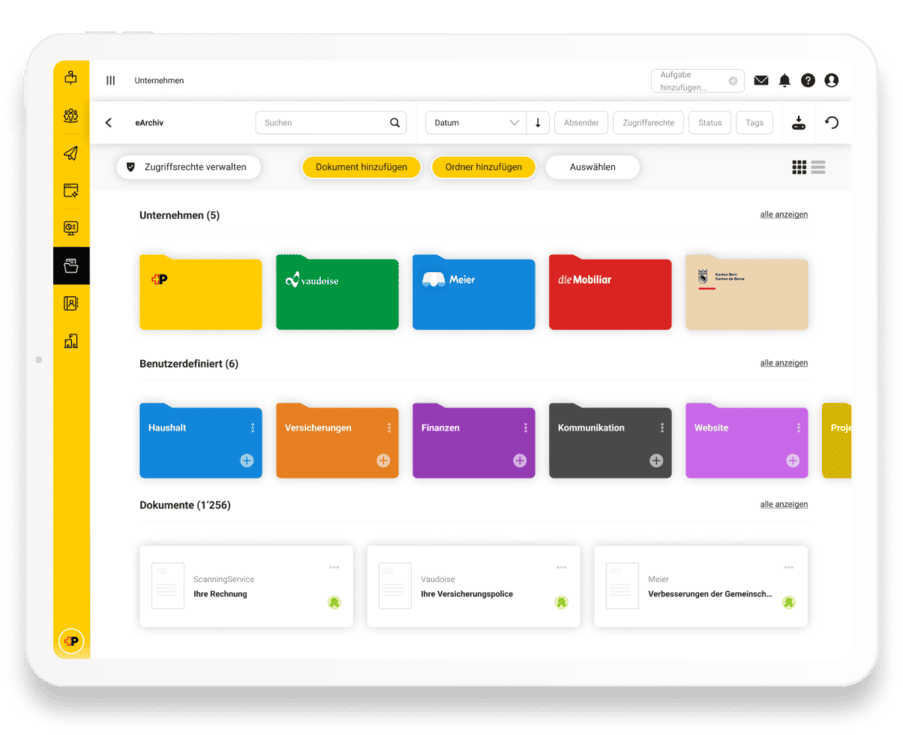
Optimize your business processes with the ePost eArchiv. Your business documents are centrally digitally archived and are available at any time for access to invoices, contracts and other important documents. Getting started is easy: Register for free and activate the ePost eArchiv. With the Plus annual subscription, you can archive your documents securely, in compliance with the law, and with individual access rights for your team.

What does the ePost eArchiv cost?

Pricing and Abos

eArchiv Basic
4.90
/ month (CHF)
or CHF 53.– with an annual subscription +1 centime per saved document
Location-independent access
Full-text search and tagging of documents
Clear folder structure incl. recycle bin
Import documents easily
GeBüv-compliant
Assignment of individual access rights*
eArchiv Plus
9.90
/ Month (CHF)
or CHF 107.– with an annual subscription +1 centime per saved document
Location-independent access
Full-text search and tagging of documents
Clear folder structure incl. recycle bin
Import documents easily
GeBüv-compliant
Assignment of individual access rights

Digitize mail – it’s that easy

Create an account

In just a few steps, you can register for ePost and have your company address verified.

Activate Widget

Activate the ePost eArchiv Basic or Plus directly in the Widget Store with just a few clicks.

Archive documents

Archive your digital documents centrally, in a revision-proof and legally compliant manner – with a retention period of up to 10 years.
ePost-data-protection-swiss-cross-350x350px

Data protection guaranteed

Secure in Switzerland

Your mail remains in Swiss data centres – local and reliably secure.​

FADP-compliant

Mail secrecy and the highest data protection standards are guaranteed at all times.​

Encrypted

From start to finish – when scanning, saving and sending.​
Why ePost eArchiv?

Your benefits at a glance

ePost-Icon-sichere-ablage-300x300px

Archived in compliance with auditing standards
Your business documents are archived in compliance with auditing standards and in a manner that ensures auditability – with a retention period of up to 10 years.
ePost-Icon-eArchiv-300x300px

Available at all times
Access your archived documents at any time and from anywhere – in the office, at home, or on the go.

ePost-Icon-Einfachheit-effizienz-300x300px

Efficiently organised
All documents are centrally stored, searchable and clearly structured. This way you can find invoices, contracts and receipts in seconds.

ePost-Icon-schnell-300x300px

Full Control
Assign individual access rights for your team and always keep control over who can view which documents.
Ready? Now digitalise your mail!

Register for free and activate the ePost eArchiv in the Widget Store. 
Other topics

You might also be interested in this

FAQ


Wie verknüpfe ich meine bestehenden Konten bei IncaMail und ePost?

In deinem ePost-Profil muss die gleiche E-Mail-Adresse erfasst sein, die du auch in deinem IncaMail-Konto nutzt. In ePost kann diese als Haupt-E-Mail-Adresse oder als zusätzliche, optionale E-Mail-Adresse hinterlegt werden. Nach Bestätigung der E-Mail-Verifikation kannst du IncaMail-Nachrichten in ePost empfangen.

Erhalte ich in ePost auch eingeschriebene IncaMail-Nachrichten?

Nein. Eingeschriebene IncaMail-Nachrichten werden ausschliesslich an dein IncaMail-Konto gesendet.

Ich nutze die ePost, aber ich möchte keine IncaMail-Nachrichten dort empfangen. Was kann ich tun?

Du kannst IncaMail-Nachrichten als ePost-Absender in der App selbst deaktivieren. Gehe hierzu in deinem Profil in den Bereich "Absender verwalten" und deaktiviere den Absender «IncaMail» der Schweizerischen Post.

Back to top

Frequently asked questions

What exactly are the eArchiv Plus functions?

In addition to the GeBüV conformity of eArchiv Basic, eArchiv Plus also provides you with the following function:

  • individual access rights at document and folder level

With individual access rights, you can grant your users access rights to individual documents. Only your company administrators have access to all documents.

Is it possible to export data from the eArchiv?

Yes, this is possible. You can order your data for download using the "Data export" function by clicking on the corresponding icon and setting a password. We will send you an e-mail as soon as your data is available for download as a zip file.

The zip is encrypted with your password so that the data remains protected after export. The file contains your entire eArchiv and the transaction data for each document. It may therefore take some time for the e-mail with the download link to be made available. The export can then be downloaded for 14 days using the link.

Can an existing archive be imported?

You can upload your locally saved documents to your eArchiv.

This is of course also possible using drag & drop.
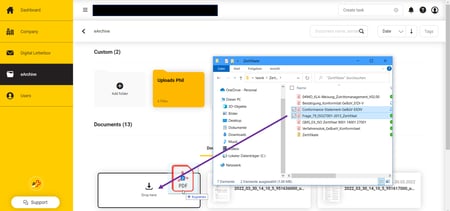
eArchiv_Dragndrop

How are access rights managed?

You can use the access rights to protect your documents by assigning access rights in the detailed view. On the document, you can see who has access to the document.

Where no lock is displayed, all users have access to this document. 

Under "Manage access rights", you can view and edit all existing access rights.

To assign access rights to another user, simply click in the Email or Name field and select the person(s) from the list. 

Under "Users" you can create additional users for your company, which are then automatically displayed in the access rights list for selection.

How do I find certain documents again?

You can create your own folders and file documents in a structured way. You can use the search field to easily search for text in your document Tags can help you keep things organised. You can limit and filter the search with the tags so that you can find the desired document more quickly.

How do I switch from eArchiv Plus to eArchiv Basic?

To change the subscription, the existing eArchiv Plus subscription must be deactivated.

The eArchiv Basic widget can be activated after the 30-day period has expired.