eBill with ePost

Send eBill – simple, secure and directly to your e-banking account

Whether you are already using SmartSend or are new to digital billing: Here you will find everything you need to get started with eBill.
Save now CHF 100
eBill discount
secure
100% FADP-compliant
{}
eBill

Send bill with eBill

With eBill, you can send invoices digitally to where they have the greatest impact: directly to your customers’ e-banking. No paper, no emails, no effort on the recipient’s side – instead, a modern, secure solution with a high payment readiness.

ePost-Icon-aktion-300x300px-neg

Action

Save CHF 100.–

Only for the first 100 companies:

Save CHF 100.– on eBill onboarding. Instead  of CHF 249.– you only pay CHF 149.–.*

Take advantage now

*Offer valid until further notice. Hurry up, it’s worth it.
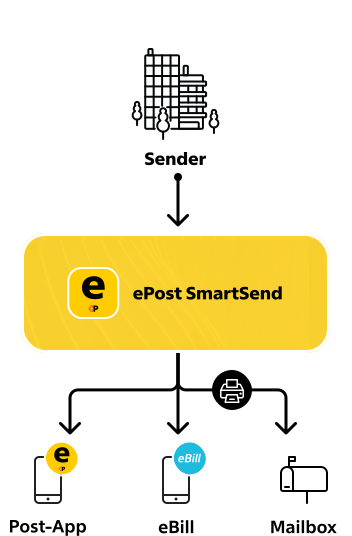
SmartSend Explainer Graphic - Send Business Mail Online
What is ePost SmartSend?

Online delivery of daily business mail

Directly from the workplace or home office – without additional software. Secure, encrypted and legally binding.

Costs

Prices and Conditions

One-time setup costs

No Biller ID yet
Price incl. VAT
CHF 249.–
Biller-ID already available
Price incl. VAT
CHF 69.–

Recurring costs

ePost-Icon-versenden-300x300px
Using SmartSend
Free
ebill-logo-bluewhite-RGB
Mailing costs per eBill
CHF 0.60
/transmission
Your benefits

Your benefits with eBill via SmartSend

Activate eBill – How to get started

Step 1

Use or register SmartSend

To activate eBill, you need a SmartSend access.

ePost-Icon-versenden-300x300px
Step 1
Step 2

Verify Company

Before eBill activation, your sender address must be verified.

ePost-Icon-verifizierte-nutzer-300x300px
Step 2
Step 3

Request and fill out the form

Request the eBill Onboarding Form online. Our support team will send you the PDF to fill out and return immediately.

Request the form
ePost-Icon-download-300x300px
Step 3
Step 4

eBill is set up

After successful verification, ePost activates the eBill channel. You can start right away.

ePost-Icon-schnell-300x300px
Step 4
Step 5

Get started right away

For an eBill to arrive successfully, the recipient’s email address must be on the invoice and match the email address registered with eBill.


ePost-Icon-digitaler-posteingang-300x300px
Step 5

Request eBill Onboarding Form

Questions? We’d be happy to advise you

We would be happy to advise you on eBill with SmartSend in a personal conversation.

Frequently asked questions.

What is eBill?

eBill is the digital standard for sending invoices in Switzerland. The invoice appears directly in the customer’s e-banking – for easy and quick payment.

What do I need to use eBill?

Just a SmartSend access and a verified sender address. ePost takes care of the rest.

Do I need an ERP system?

No. eBill via SmartSend also works without an ERP.

How does verification work?

ePost checks your sender address. All the steps for this can be found in Chapter 6.

What happens if the email address is incorrect?

eBill can only be delivered if the email address on the invoice matches the customer’s registered eBill address. Without a match, delivery is not possible.

How long does the setup take?

Usually a few working days after receipt of the form.

How do I set up eBill with SmartSend?

With ePost SmartSend, you can send your invoices digitally – including eBill delivery directly to your customers’ e-banking. 

To use eBill with SmartSend, follow these steps:

  1. Open a SmartSend account and verify your company address.

  2. Request, fill out and return the eBill onboarding form from ePost.

  3. Activation by ePost: After successful verification, ePost activates eBill for your company.

  4. Send invoices: You can then send your invoices as eBill via SmartSend – automatically, easily and directly to your customers’ e-banking.

Other topics

This might interest you too